
Many people get confused about the process, but it is actually quite simple to get PUK code in Nepal if you have your identity documents ready. Are you facing a locked SIM card and looking for a reliable solution? You are in the right place. In this guide, we will provide you with the most effective methods to get PUK code in Nepal for both NTC and Ncell users. Whether you have misplaced your SIM details or accidentally locked your device, follow our step-by-step 2026 update to recover your access immediately..
Therefore, this article deals with how to get a SIM card PUK code. It’s quite easy and simple to get this code. Here you are.
What is the PUK code?
PUK (Personal Unlocking Key) also known as PUC (Personal Unlock Code) is an eight (8) digit code that we require to unblock the SIM card when you enter the wrong PIN code continuously three times. And if you enter the wrong PUK code ten times in a row, your SIM as well as your Phone may permanently get blocked.
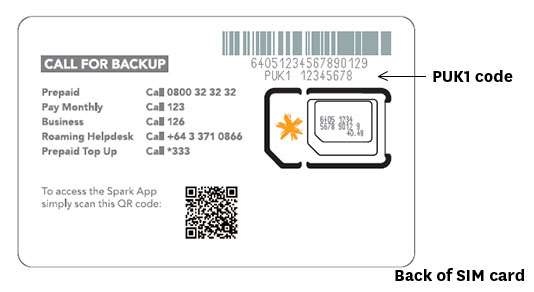
So, after you get the SIM card PUK code, remember your PIN code and PUK code if you can or at least note it down somewhere you can easily find it when needed. After all, these codes are for the safety of your SIM card and phone.
What benefits of locking the SIM card?
We lock our SIM or Phone for security purposes. Therefore, we have mentioned some purposes for locking the SIM card as it is related to the requirement of the PUK code.
- It secures the SIM card from unauthorized users.
- This also keeps us safe from any issue in case you lose your SIM card or Phone.
- We can avoid the risk of data leakage and misuse of information.
- Also to abstain from the situation where we might panic.
How to Get PUK Code for NTC (Nepal Telecom)?
If you have entered the wrong PIN code multiple times and your NTC SIM is locked, don’t worry. You can recover your PUK code using these three official methods.

1: Calling NTC Customer Care (1498)
When you call 1498, clearly mention that you are trying to get PUK code in Nepal for your NTC SIM card, and the representative will assist you with the verification.
Step 1: Use another NTC SIM and dial 1498.
Step 2: Request to speak with a customer care representative.
Step 3: Explain your problem and provide the necessary details such as the SIM owner’s name, date of birth, and the 19-digit ICCID number (the code printed on the back of your SIM card).
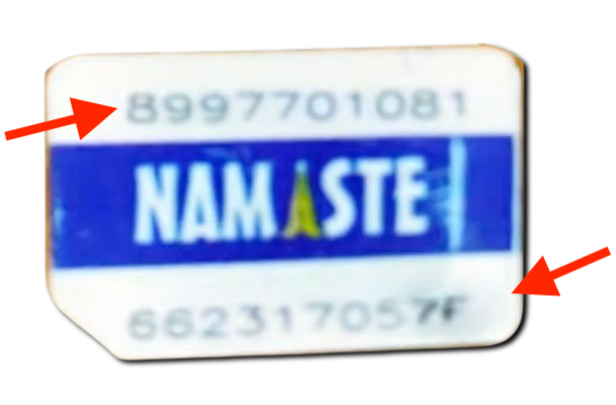
Step 4: Once they verify your details, they will provide the PUK code.
Note: If they hesitate, provide your details confidently and request them to verify, as it is your right as a registered user.
2: Via SMS (For Unlocked Handsets)
If your SIM is locked but your device still allows you to access the messaging app, you can try this:
Step 1: Open your messaging app.
Step 2: Type PUK (in capital letters) and send it to 1415.
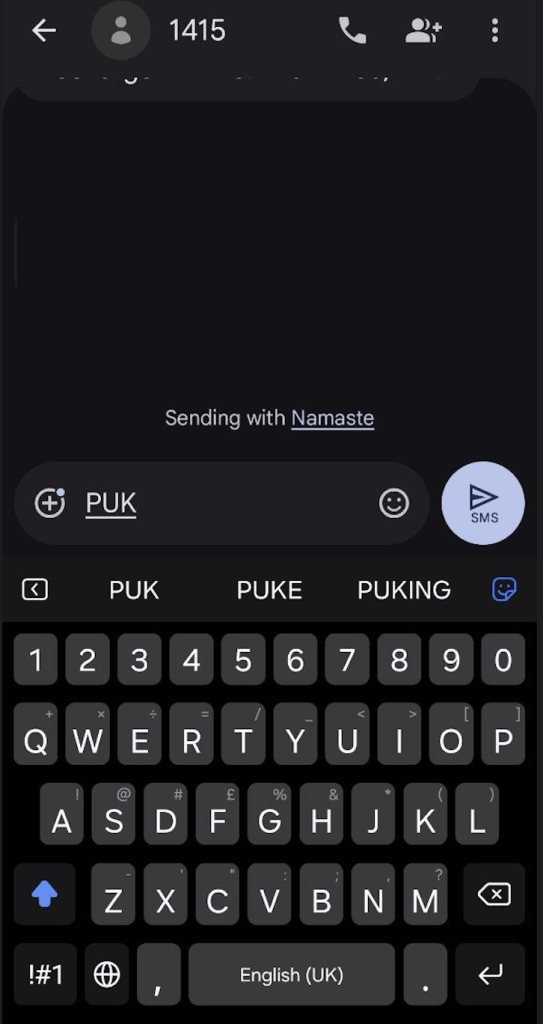
Step 3: You should receive a reply from NTC containing your PUK code.
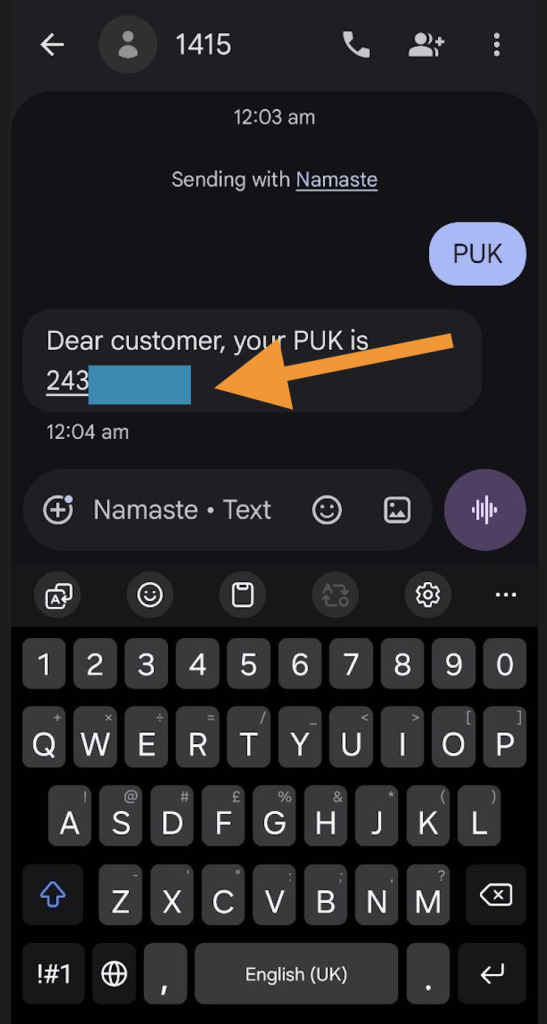
- Pro Tip: If your smartphone is completely locked, remove your SIM and insert it into an old 2G or keypad phone. Many times, these devices do not restrict messaging features even when the PUK is required, making it easier for you to send the SMS.
3: Visiting the Nearest NTC Office
If the online or remote methods do not work, visiting the office is the most reliable option.
- Step 1: Locate your nearest Nepal Telecom office or branch.
- Step 2: Carry your original Citizenship Certificate (or a photocopy if required) to prove you are the owner of the SIM.
- Step 3: Provide your registered mobile number to the counter staff. They will verify your identity and provide the PUK code instantly.
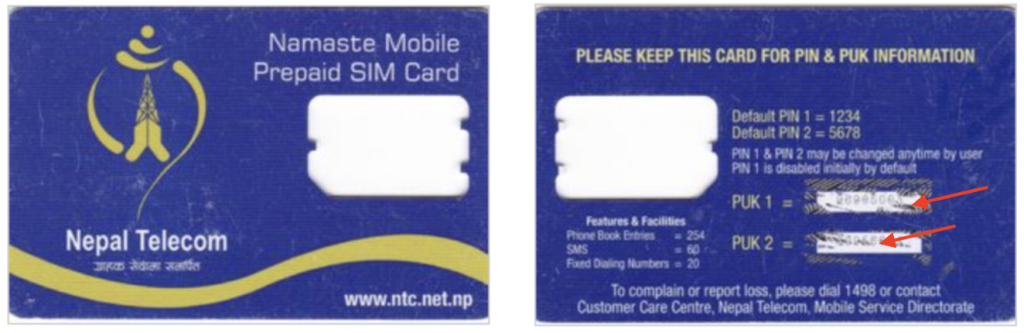
4. Check Your Welcome Card:
If you still have the original welcome card that came with your SIM, check the back of it. You will see a scratchable area where your PUK 1 and PUK 2 codes are printed. Always keep this card in a safe place, as it is the easiest way to recover your SIM without contacting support.
Important Warning:
Be very careful! Do not guess your PUK code. If you enter the wrong PUK code 10 times in a row, your SIM card will be permanently disabled, and you will have to buy a new SIM card to recover your number.
After you successfully unlock your NTC SIM, you might also want to know how to manage your credit balance. If you are interested, check out our guide on [How to Transfer Balance in NTC] to easily share your balance with friends and family.
How to Get PUK Code for Ncell Sim?
If your Ncell SIM is locked due to multiple incorrect PIN entries, you don’t need to panic. You can easily recover your PUK code using the official Ncell App or by contacting customer support.
1: Using the Ncell App (Fastest Way)
Using the official Ncell App is often the fastest way for users to get PUK code in Nepal without having to deal with long customer care wait times.
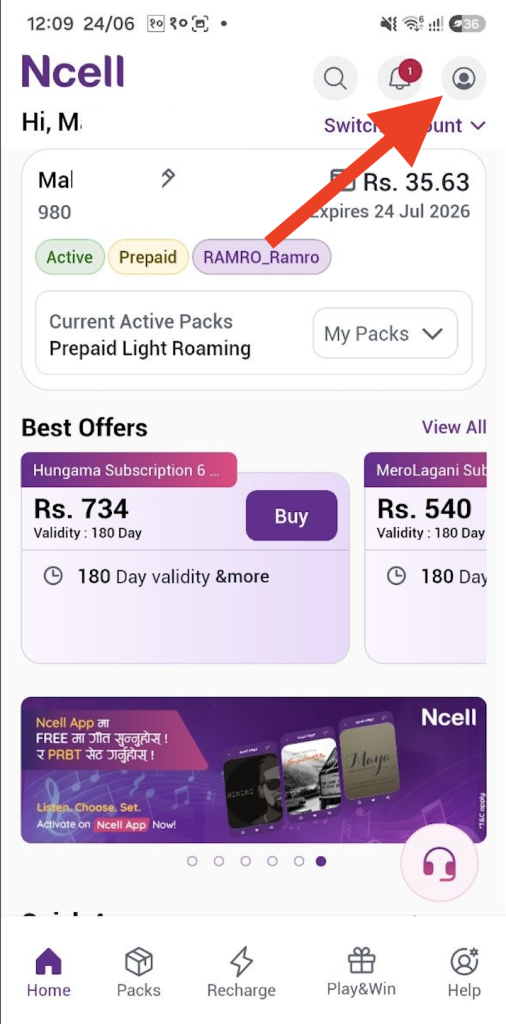
Step 1: Open the Ncell App on your smartphone.
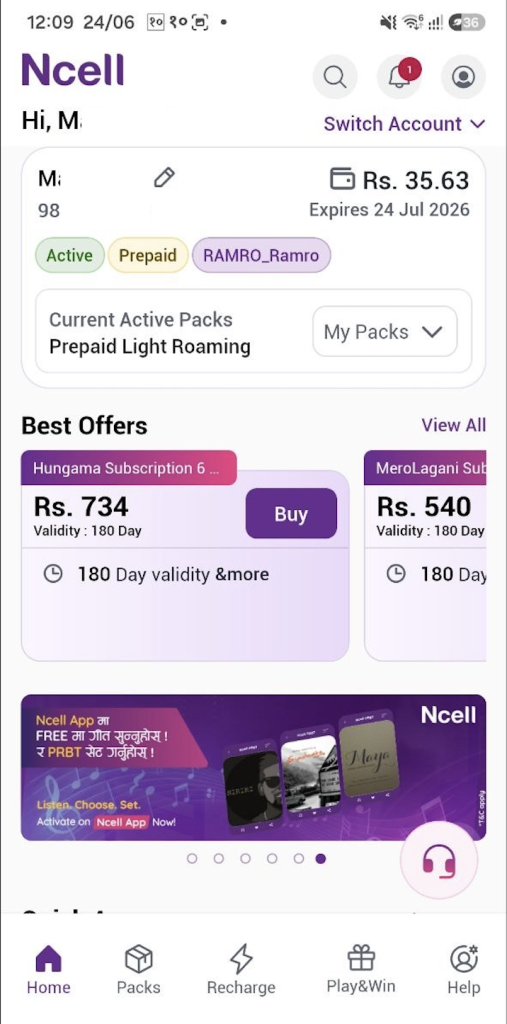
Step 2: Tap on the Profile icon located at the top corner of the screen.
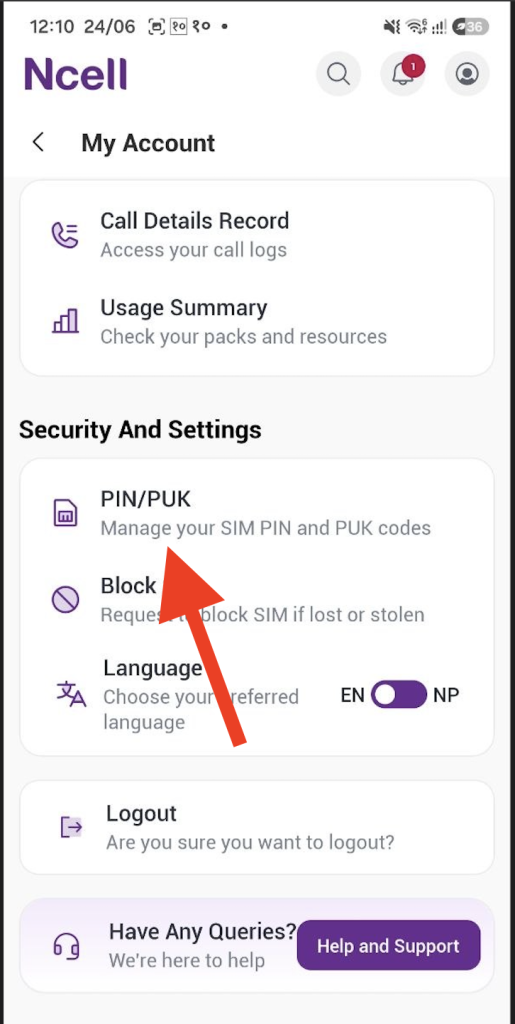
Step 3: Scroll down to the bottom of your profile page. Look for the “Security & Settings” section. You will find an option labeled “PIN/PUK Code”. Tap on it.
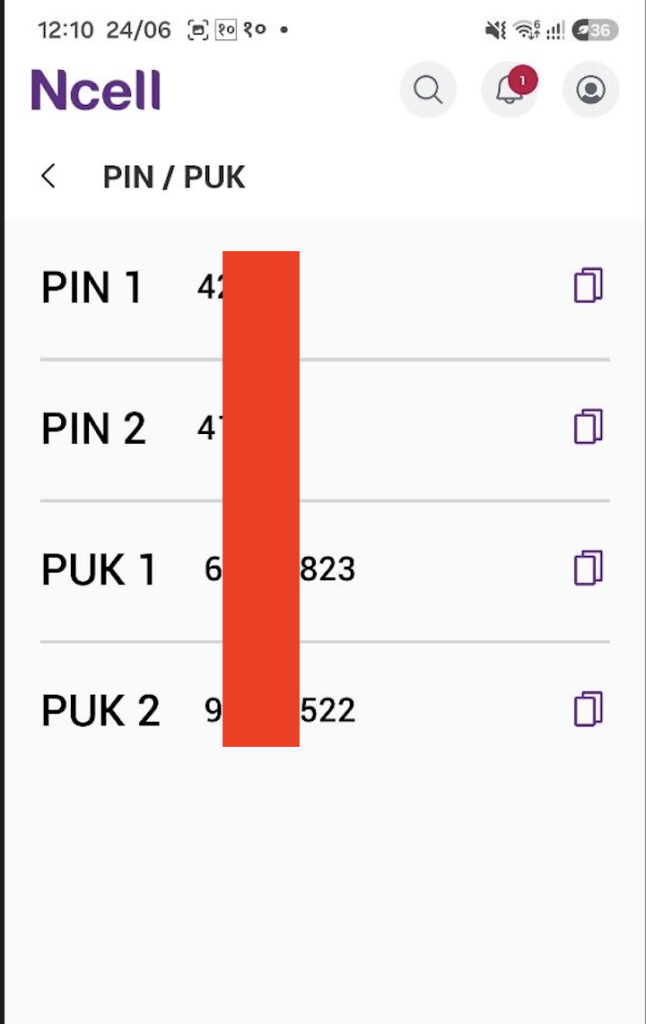
Step 4: The app will instantly display your PIN 1, PIN 2, PUK 1, and PUK 2 codes. Note them down carefully.
2: Calling Ncell Customer Care
If you cannot access the app or are not logged in, you can reach out to Ncell support.
Step 1: Call 9005 (or Ncell’s official customer service number) from another Ncell number.
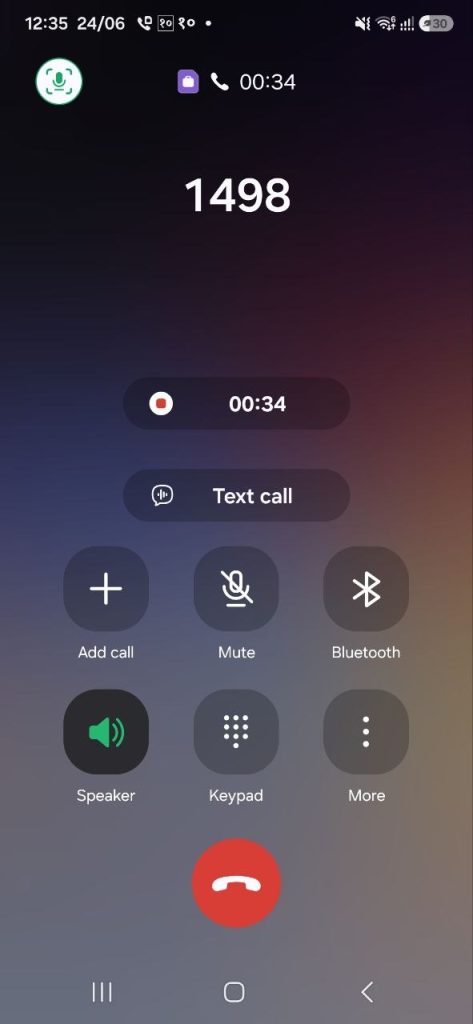
Step 2: Request to speak with a representative and explain that your SIM is locked.
Step 3: You will be asked to verify your identity. Be ready to provide details like the SIM owner’s name, Date of Birth, and the 19-digit number printed on the back of your SIM card.
Step 4: Once the agent verifies the information, they will provide you with your PUK code over the call.
What if the SIM card code is faded or missing?
Just like NTC, Ncell SIM cards also have a security limit. Do not enter a random PUK code. After 10 failed attempts, your SIM card will be permanently blocked, and the only remaining option will be to get a new SIM card from an Ncell Centre. Always ensure you have the correct code before entering it.
Common Problems While Getting PUK Code
Identity Verification Failure: If the information you provide (name, DOB, or citizenship details) doesn’t match the government or telecom database, they will refuse to share the PUK code. Fix: Always keep your citizenship card handy during the call.
Incorrect SIM Serial Number: Many users struggle to read the 19-digit number on the back of the SIM due to wear and tear. Fix: Try using a magnifying glass or a bright light to read it clearly before calling.
Customer Care Busy/Unresponsive: Sometimes, getting through to a live agent is difficult. Fix: Try calling during off-peak hours, such as early morning or late night, when call volume is lower.
SIM Permanently Blocked: Entering the wrong PUK code 10 times will permanently disable the SIM. Fix: Stop immediately if the code isn’t working and visit the nearest telecom office instead of guessing.
Outdated Registered Info: If you bought the SIM a long time ago and your registered details (like address or contact number) have changed, the system might not verify you. Fix: Visit the office to update your KYC (Know Your Customer) details.
Comparison Table: PUK Code Recovery (NTC vs. Ncell)
| Features | NTC (Nepal Telecom) | Ncell |
| Primary Method | Call 1498 (Customer Care) | Ncell App (Security Section) |
| SMS Method | Possible (Send ‘PUK’ to 1415) | Not Available |
| App Convenience | Limited self-service for PUK | Very easy (Directly shows in App) |
| Office Visit | Required if info is mismatched | Required if info is mismatched |
| Verification Info | Owner’s Name, DOB, 19-digit SIM Code | Owner’s Name, DOB, 19-digit SIM Code |
| Safety Limit | 10 Attempts Max | 10 Attempts Max |
Frequently Asked Questions (FAQ)
Is there any charge to get the PUK code?
No, providing the PUK code is a free service offered by both NTC and Ncell to their legitimate users.
How many times can I enter the PUK code?
You have exactly 10 attempts. If you enter the wrong code 10 times, your SIM card will be permanently blocked.
Can I get someone else’s PUK code?
No, for security reasons, telecom providers only share the PUK code with the registered owner of the SIM card after verifying their identity.
What should I do if my SIM card is permanently blocked?
If the SIM is permanently blocked after 10 failed attempts, you will need to visit the nearest NTC or Ncell center and request a new SIM card for your existing number.
Do I need my original citizenship card?
Yes, it is highly recommended to carry your original citizenship certificate when visiting the service center, as it is the primary document for identity verification.
Conclusion
Getting your PUK code shouldn’t be a stressful experience. Whether you are using NTC or Ncell, the official channels like customer care, mobile apps, or visiting a nearby service center are designed to help you regain access to your SIM card safely. Always remember to keep your citizenship details and SIM card identification number handy to speed up the verification process. Most importantly, avoid guessing your PUK code to prevent permanent damage to your SIM card. If you follow these steps carefully, you will be back online in no time!
We hope this guide successfully helped you get PUK code in Nepal. If you still have trouble, feel free to comment below!
Watch: Tutorial to Unlock Your SIM Card
Are you having trouble following the steps? Watch this video tutorial to see the live process of recovering your PUK code in just a few minutes.