
Looking for an easy How to change phone number in eSewa? While setting an eSewa ID, you must have linked a phone number with it which is used for the login and verification process. You may be in need to replace this number with a new number due to different reasons. If you want to change your phone number in eSewa, this article can be helpful to you.
There are many reasons you want to replace your mobile number in eSewa. Maybe you have lost your sim card or you are no longer interested in using it. Whatever the reason, you can change it easily following a few simple steps.
Why Changing Your eSewa Phone Number is Critical
Updating your phone number in eSewa goes beyond keeping your contact information up to date; it is an important step in maintaining your digital financial health. Your mobile number serves as your main identity and security link in the eSewa system. Delaying this update can lead to serious problems. Here is why this process is crucial:
- Improved Financial Security
Your eSewa account connects directly to your funds and often your bank accounts. If you lose access to your old SIM card or if that number gets assigned to a new user by the telecom company, your financial data becomes vulnerable. Switching to a new, active number ensures that only you hold the “keys” to your wallet. - Uninterrupted Access to OTPs and Alerts
Every major action in eSewa, such as logging in on a new device, resetting a forgotten password, or authorizing a large transaction, requires a One-Time Password (OTP). If your account is linked to an old or inactive number, you will be locked out of these essential functions. This can cause delays in your daily transactions. - Prevention of Identity Theft
In Nepal, telecom providers can recycle inactive mobile numbers after a certain time. If someone else gets your old number and realizes it is still linked to an active eSewa ID, they might try to hijack your account. Updating your number helps protect your digital identity and personal privacy. - Easy Account Recovery
If you ever lose your phone or forget your login credentials, your registered mobile number is the main tool for recovery. Ensuring your current number is on file makes the recovery process quick and stress-free, eliminating the need for long manual verifications with customer support. - Meeting KYC Regulations
To keep a verified status and access higher transaction limits, your eSewa details must match your current documents and active contact points. An updated phone number helps your account stay compliant with Nepal Rastra Bank’s latest digital payment rules, preventing any unexpected service suspensions.
Essential Preparation Checklist
Before you start the number change process how to change phone number in eSewa, make sure you have the following ready to avoid any interruptions:
- Active New SIM Card:
Ensure your new mobile number is active and inserted in your phone so you can receive the verification OTP. - Verified eSewa KYC:
Check if your current account is KYC verified. If not, complete the verification first, as unverified accounts may face issues during the number update. - Digital Documents:
Have a clear photo or scanned copy of your Citizenship Certificate, License, or Passport ready. You will need to attach this to your request email for identity verification. - Stable Internet Connection:
A secure connection is needed for unlinking devices and sending the formal email request.
How to Change Phone Number in eSewa?
First of All, you need to add your desired mobile number in eSewa Wallet. After that, you need to send an email to eSewa requesting to change your phone number. eSewa will verify your information and complete the process. Here’s the complete guide for you to change your phone number in eSewa ID.
Follow these steps to How To change phone number in eSewa.
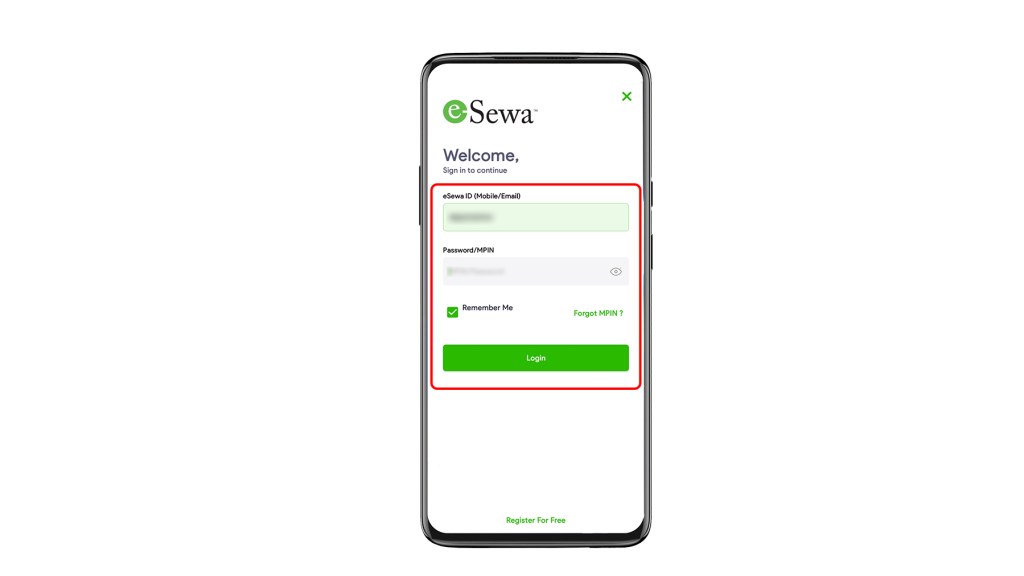
1. Login to your eSewa account from eSewa App.
Click Here to Download eSewa App.
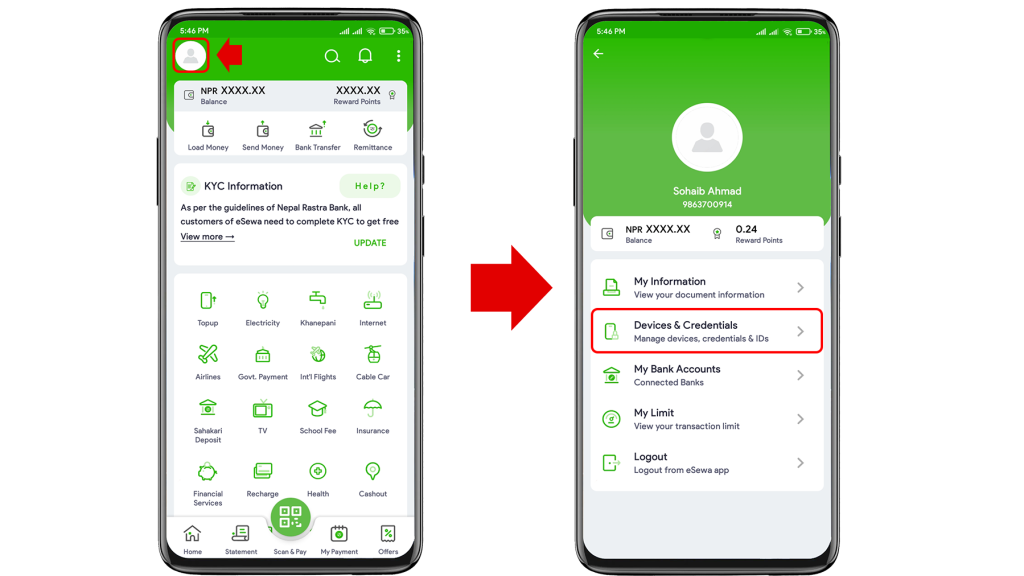
2. Click on the ’Profile’ icon and select ‘Devices and credentials’.
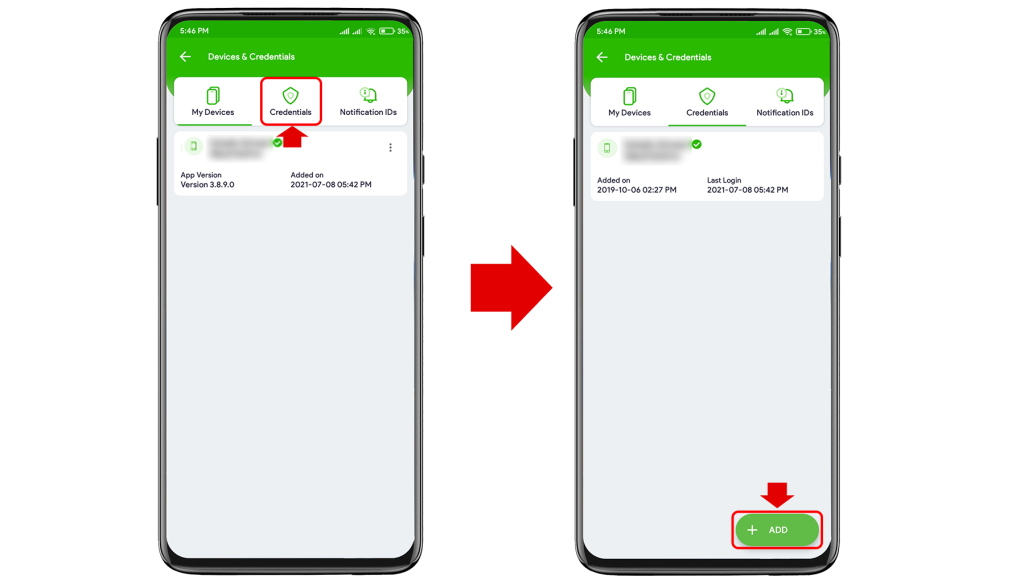
3. Select ‘Credentials’ option and tap on the ’Add’ button.
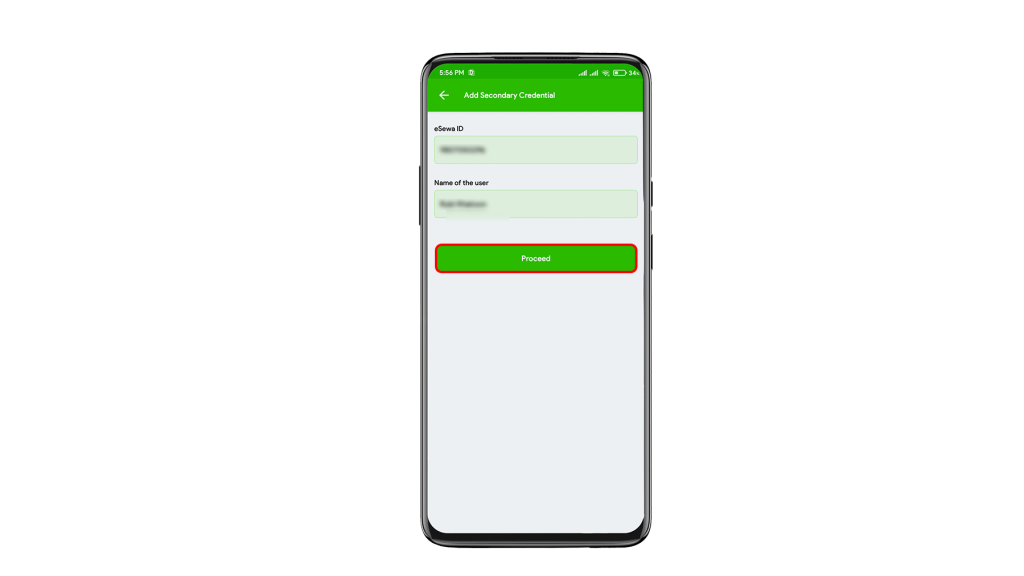
4. Enter your desired phone number and name of the user.
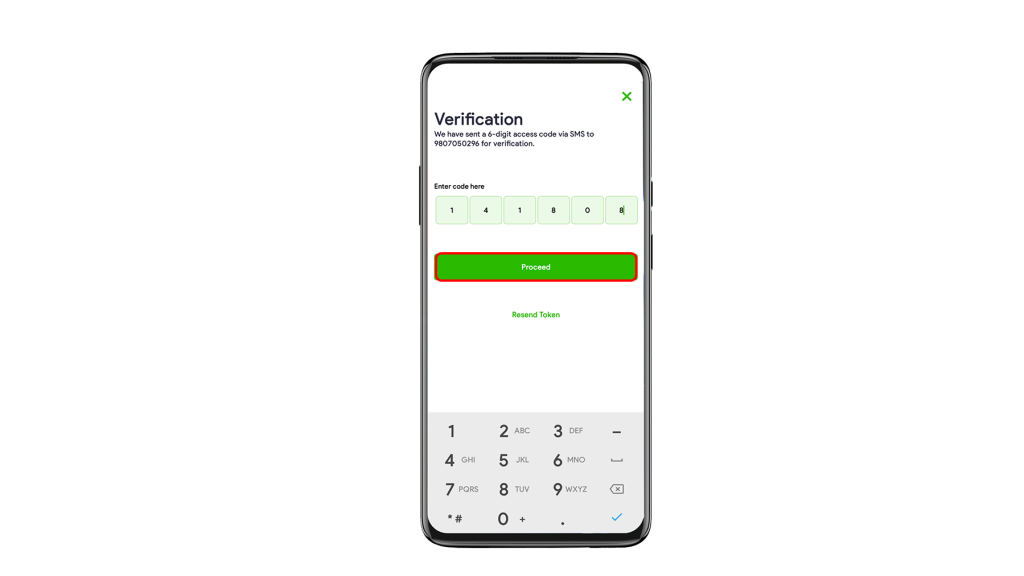
5. Verify your OTP which you will recieve through SMS.
6. Create new MPIN for the added mobile number and you are all done.
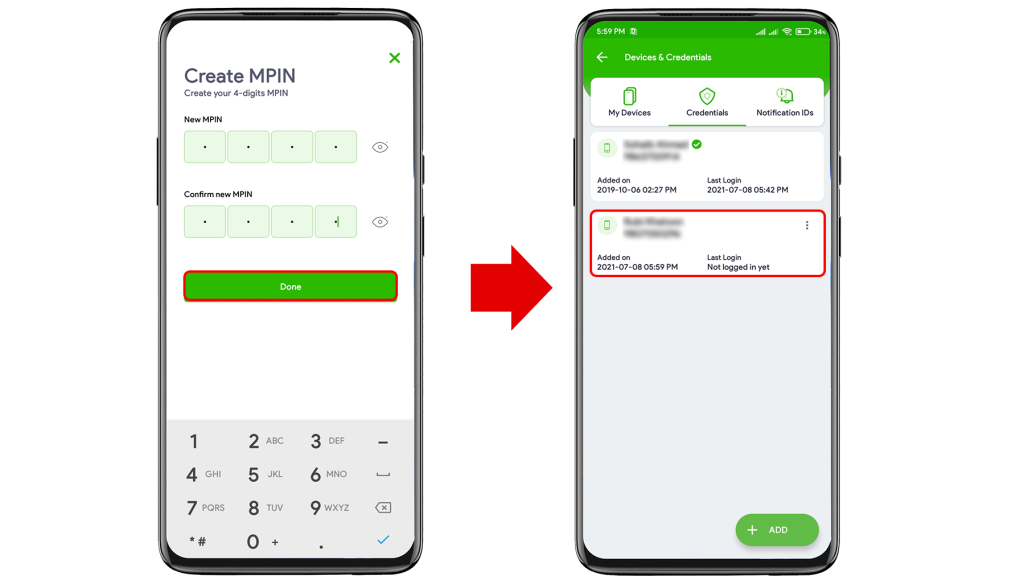
After completing these steps, you need to verify the added number. It will be tick marked after the verification. Then only you will be able to use the added number for your login and other processes.
For this, you will have to send an email to eSewa at csd@esewa.com.np asking to replace the phone number. eSewa will switch your phone number automatically after verifying your information.
Letter Format for How To change phone number in eSewa.
To,
The Manager
eSewa Fonepay Pvt. Ltd
Subject: To Change Phone Number in eSewa

Dear Sir/Madam,

I would like to request you to change my old phone number which I had linked with eSewa ID as I am no longer interested in using it. Please replace my old mobile number 980******* [Your Old Phone Number] with the new number 980******* [Your New Phone Number] as soon as possible.
I hope for a positive response from you.

Thanking You,

Chet Raj Thapa
eSewa ID: 980*******
Email: chetraj63@gmail.com
Kathmandu-04, Nepal
Click here to download the letter format for How to change phone number in eSewa.
Troubleshooting Common Issues
Sometimes things don’t go as planned. Here are solutions to common problems you might face during the update:
1. OTP Not Received on the New Number?
- Check Signal Strength:
Make sure you have a strong network on your new SIM. - Messaging App Settings:
Check that your default messaging app is not marking eSewa messages as spam. - Wait and Retry:
SMS gateways may be busy. Wait for 5 minutes before asking for a new OTP.
2. Slow Email Response from eSewa?
If you haven’t received a reply to your email within 24 to 48 hours, don’t worry. You can make the process faster by contacting their support directly:
NTC Toll-Free: 1660-01-02121
Ncell Toll-Free: 1810-21-02121
Hotline Number: 01-5970121
Viber/WhatsApp Support: You can also contact eSewa’s official social media pages for a quicker follow-up on your pending request.
After the verification from eSewa, you can remove your old phone number from your eSewa ID. Else it will be used as your secondary number.
Check out this article if you are interested: How to Delete eSewa Account?
Frequently Asked Questions (FAQ)
1. Can I change my eSewa number without sending an email?
Currently, for security reasons, eSewa requires a formal email request and your identity documents to confirm that you are the real owner requesting the change.
2. Will I lose my eSewa balance after changing the number?
No, your balance, reward points, and transaction history will remain safe. They will be transferred from your old number to your new number during the process.
3. How long does it take for eSewa to update the phone number?
Usually, it takes 24 to 48 working hours after you send the email with all the correct documents.
4. Can I use two phone numbers for one eSewa account?
You can add secondary numbers for login, but your primary eSewa ID (the one used for receiving funds) will be only one.
5. What if I don’t have my old SIM card?
If you lost your old SIM, the process remains the same. Since you are providing your Citizenship or License for verification, eSewa will process your request even without access to the old SIM.
Conclusion
Keeping your eSewa account updated with your latest mobile number is an important step to secure your finances in Nepal. Whether you lost your SIM card or switched to a new provider, completing this process ensures that you don’t lose access to your money or important transaction alerts. Your digital wallet is essential for daily payments, so managing it well helps create a smooth experience.
We hope this guide helped you with the number change process. If you have any questions or ran into issues during the verification, please leave a comment below; we are here to help! Also, don’t forget to check out our other guides on eSewa security, like how to delete your account or link your bank safely. Stay updated with TechnoKD for the latest tech tips, security advice, and app reviews to simplify your digital life.
Visual Guide: Watch this Video for Step-by-Step Instructions
This is all about How to change phone number in eSewa. If you have any queries regarding this topic, please comment on us. I have already written about different queries regarding the eSewa Wallet.
Subscribe to our technokd for the latest tech news, tips & tricks, and tech reviews.
1 Comment