Many organizations and individuals have their account/ID on different online social media platforms. However, most of them still overlook the significance of a strong password. In this article, we’ll know how to set a secure and strong password. This is essential for us to remain safe from the cyber-criminals as they can have access to various platforms by just guessing the right password.
On different platforms, we are logged in through the username and password of another platform. This makes us vulnerable and prone to get revealed. Therefore, we have brought to you this article to let you know the importance of strong password and how to set it. Go through this article and make your password strong as soon as possible.
Benefits of setting a secure and strong password:
To protect your online accounts, you need to start with one crucial step: creating a password that is strong and secure. Many people still use easy-to-guess passwords, thinking nothing will go wrong. The reality is that these passwords can be hacked quickly. A strong password adds an extra layer of protection, keeping your personal information safe from falling into the wrong hands and helping to prevent various cyber threats.
Why a Strong Password Matters
One of the best reasons to have a strong password is that it stops cyberthieves from stealing your identity or breaking into your account. Hackers often target weak, predictable passwords. When your password is strong and unique, it acts as a solid barrier, making it difficult for them to get in.
Keeping Your Account Secure
Setting a strong password ensures that unauthorized people cannot access your account. For example, think about when someone borrows your phone without asking and looks through your messages, emails, financial apps, or social media. A secure password keeps your personal data private.
A strong password also forces hackers to work harder to guess your login information. Many cyberattacks happen because people choose passwords that are very easy, like “123456” or their own name. Hackers have tools to crack those passwords in seconds, but a strong, complex password is like a firebreak against these attacks.
Even More Benefits of Strong Passwords
Strong passwords also help prevent data leaks. If hackers obtain your password, they can steal your photos, documents, financial information, and even your digital identity. A secure password keeps all your sensitive data safe from prying eyes.
The benefits don’t end there. Strong passwords also ensure your digital wallet is secure, your banking apps are protected, and your social media accounts are safe. You can have peace of mind knowing your privacy is intact across all online platforms. Using a strong password is the best first line of defense against the risks of the online world.
Tips to set strong and secure password:
- Abstain from using sequential letters or numbers.
Sequential letters and numbers can easily be guessed by the cyber criminals and thus can hack your account. For example, qwerty, 12345, ijkl, 6789, 4321, abcd, and so on. So, try not using such sequence.
2. Do not include your personal information like birth date, day, month or year.
Such information should not be used in/as password as the cybercriminals can easily find them and hack by snooping through the social media accounts.
3. Combine unrelated words or phrases.
A strong password can be created by combining unrelated words or phrases like 4pic@trichobinlog.
4. Avoid using dictionary words.
The words in the dictionary can be guessed quite easily as the word may be related to any aspect of your life. Thus, keep yourself away from using dictionary words for security.
5. Try using at least eight letters, numbers or symbols.
On many platforms, you are already suggested to create the password of at least 8 characters. No matter you are suggested or not, it’s recommended to create the password of more than 8 characters to make it strong.
6. It’s recommended to use a password manager to store the password.
Instead of storing the password in any document on your computer, you can store it using the password manager tool provided by the IT/support team.
7. Do not reuse any of your passwords.
Using the same password for different platforms can create room for the hackers to access all the accounts by getting the password of any single account.
Some other tips:
- Using Bruce Schneier’s method:
Since 2008 to this day, Bruce has recommended a password method. This method prescribes to turn a sentence into a password using symbols, numbers and letters.
For example: I have two cats. can be turned into ih@v2kats. Looks cool, right? However, all you need to do is to just remember the sentence. Isn’t it interesting?
2. Choosing random string of words:
In this process, you can think of few random words and join them or manage anyhow to make a password out of them.
For example, horsegrassbrowntown, whogonemanthey, and so on.
3. Use of online password generator:
If you don’t want to set your own password, you can consult or follow online password generator to create a secure and strong password.
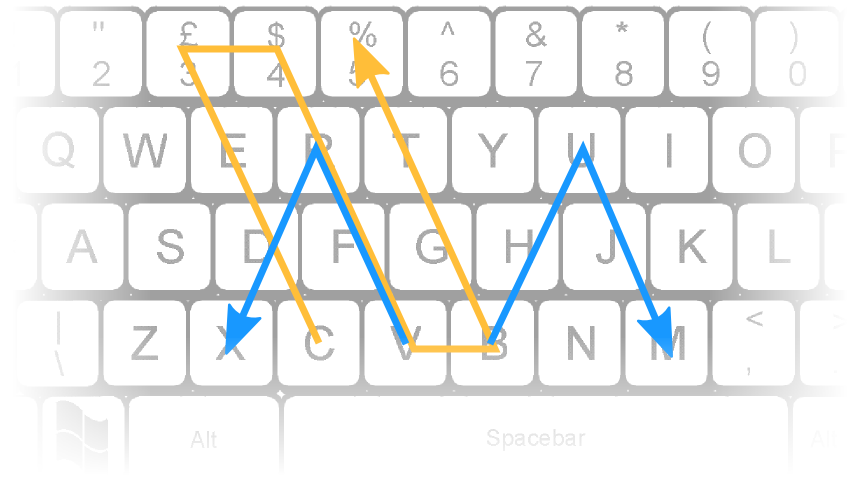
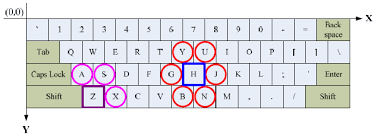
4. Playing with keyboard:
You can also use the keys on the keyboard to form a password in a pattern. Select the keys on the keyboard for the password in such a way that they make a memorable pattern.
Remembering the password:
Once you have set the password, do not forget to note it somewhere. Although, it is difficult to guess for the hacker, it’s also difficult for you to remember. Better to note it on a sheet of paper and try memorizing it. As you master remembering the password in the world’s limitless and powerful storage device i.e. your memory, you can burn or throw the paper to dispose.
Conclusion:
Lastly to say, we got to know how to set a secure and strong password. This password method is useful for any and every platform. This way, you can keep your account safe from the cybercriminals by preventing it from being hacked. Hope this article benefitted you. If yes, please stay tuned for upcoming articles, and also feel free to comment to us so that we can know if you have anything to say.
If you want to learn how to change the password for your eSewa account, read this article.
Subscribe to our newsletter for the latest tech news, tips & tricks, and tech reviews.