
If you have already completed your National Identity Card registration in Nepal, you can now easily Download Rastriya Parichaya Patra online through the official system. The newly introduced eNID (Electronic National Identity Card) is a digital version of your National Identity Card that can be accessed and used from your mobile phone whenever needed. In this guide, we will show you the complete process to Download National Identity Card eNID, create your account, verify your details, and get your digital identity card in just a few minutes. If you are looking for an eNID Download Nepal tutorial in 2026, this step-by-step guide will help you do it without any confusion.
What is eNID in Nepal?
eNID (Electronic National Identity Card) is the smart, digital version of your physical National Identity Card issued by the Government of Nepal. It serves as a secure digital key that allows you to access and verify your official identity details online without carrying the physical card. Once your registration and biometric verification are successfully completed, your profile becomes active in the official government database. This digital platform ensures faster, more secure verification for government services, banking, and other administrative tasks. By eliminating the need for physical documents, eNID is a major step toward making identity management easier and more efficient for every citizen in Nepal.
Who Can Download National Identity Card (eNID)?
You can download your eNID once your National Identity Card registration is successfully completed and verified by the concerned authority. Simply access the official government portal and use your registered mobile number to retrieve your details. Ensure you have the mobile number linked to your application, as it is required for verification. This digital copy allows you to easily prove your identity without needing to carry the physical card.
Essential Requirements Before You Download Rastriya Parichaya Patra
Before you begin the process of accessing or downloading your eNID, make sure you have the following requirements ready to ensure a smooth verification experience:
- Completed Registration: You must have successfully completed your National Identity Card registration process at an authorized District Administration Office or a designated mobile enrollment center.
- Verification Status: Your personal details must be officially verified and approved by the Department of National ID and Civil Registration. If your application is still “Under Process,” the system may not show your digital record.
- Registered Mobile Number: You must have access to the same mobile number you provided during your registration. The system will send a secure verification code (OTP) to this number to confirm your identity.
- Active Internet Connection: A stable internet connection is required to access the official government portal, as the system retrieves your real-time data from the central database.
- Valid Personal Details: Keep your Citizenship Certificate or the Application Receipt provided during enrollment handy, as you may need to enter your application number or specific personal details to match your record in the database.
How To Download Rastriya Parichaya Patra eNID?
Follow these simple steps to access your National Identity Card information through the official government portal:
1. Visit the Portal
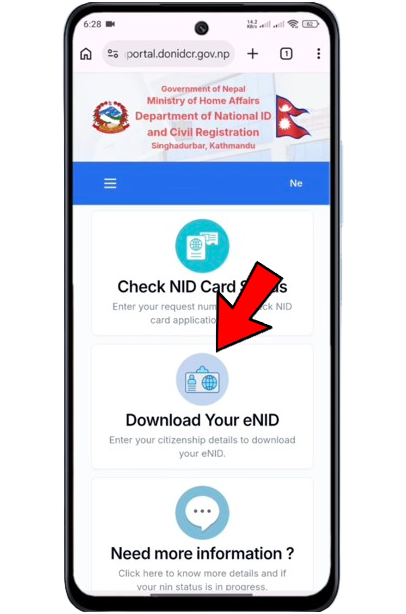
Go to the official website of the Department of National ID and Civil Registration. at https://citizenportal.donidcr.gov.np/en . This is the only authentic source for your eNID information. Once the homepage loads, Click on the “Download eNID” option. This will redirect you to the official eNID retrieval form.
2. Fill in Your Personal Details
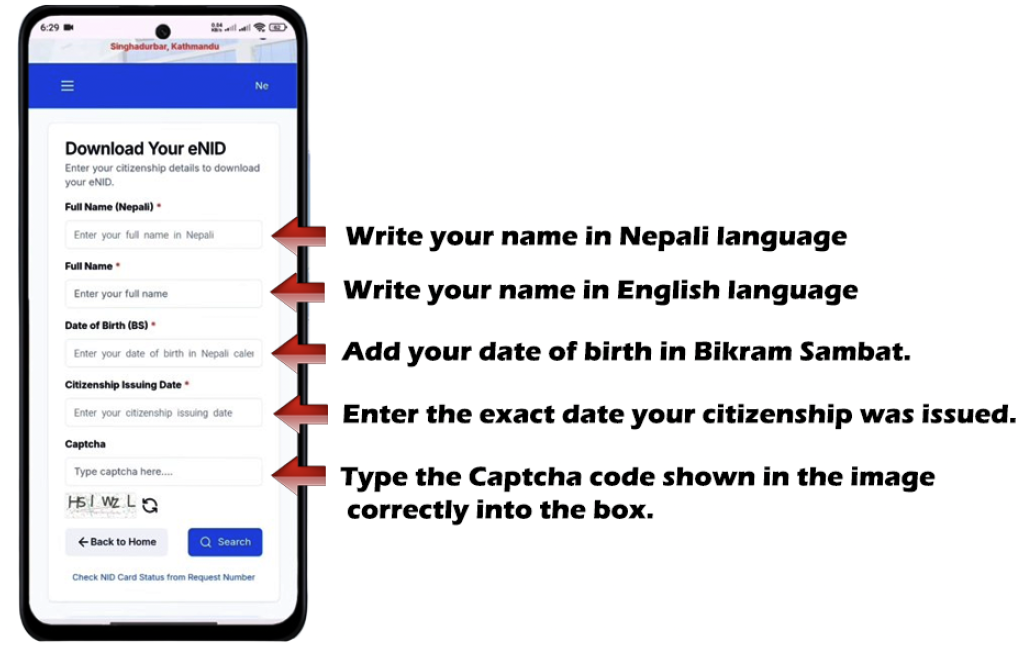
Carefully enter the following information exactly as it appears on your citizenship certificate:
- Full Name (Nepali): Enter your name in Nepali script.
- Full Name (English): Enter your name in English.
- Date of Birth (BS): Select your date of birth in Bikram Sambat.
- Citizenship Issuing Date: Enter the exact date your citizenship was issued.
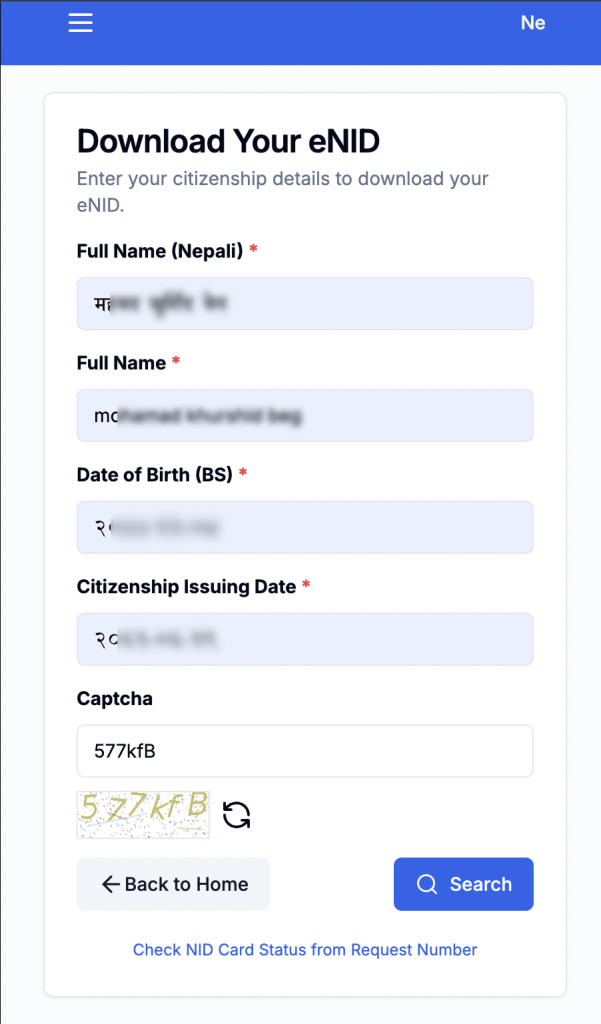
- Captcha: Type the Captcha code shown in the image correctly into the box.
3. After verifying the code, click the “Search” button.
4. OTP Verification Process.
After you click the “Search” button, the system will verify your details against the government database. Once your information is validated, an OTP (One-Time Password) will be sent to the mobile number you provided during your initial registration.
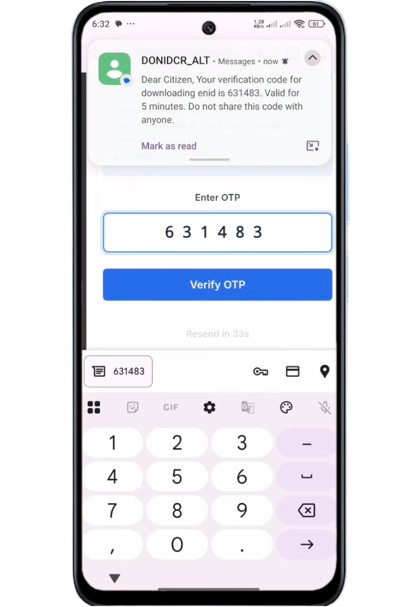
5. Downloading Your eNID (PDF Format).
Once the OTP is verified successfully, your National Identity Card profile will appear on the dashboard. Below your ID card details, you will see a clear “Download” button. Click on it to start the process. The system will automatically create a digital version of your card. Depending on your browser settings, it will save the file directly to your device.
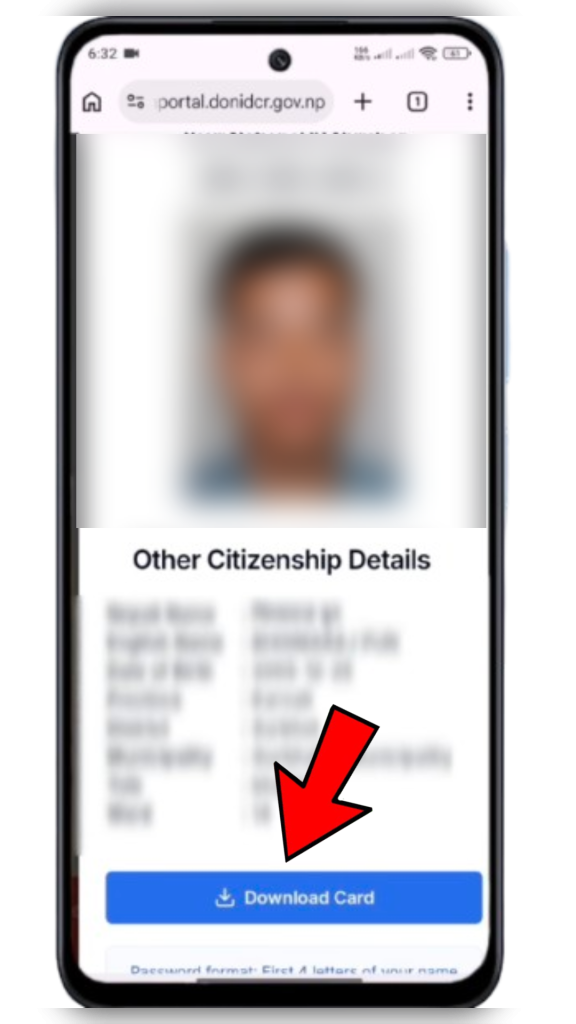
6. Where to Find the Download Pdf File.
After the download is complete, open the “File Manager” or “My Files” app on your smartphone. Check the “Downloads” folder. You can also look in the “Recent” section of your file manager, which shows the most recently downloaded files. The file will be saved with a standard name, usually appearing as National_ID_Card_XXXXX.pdf.
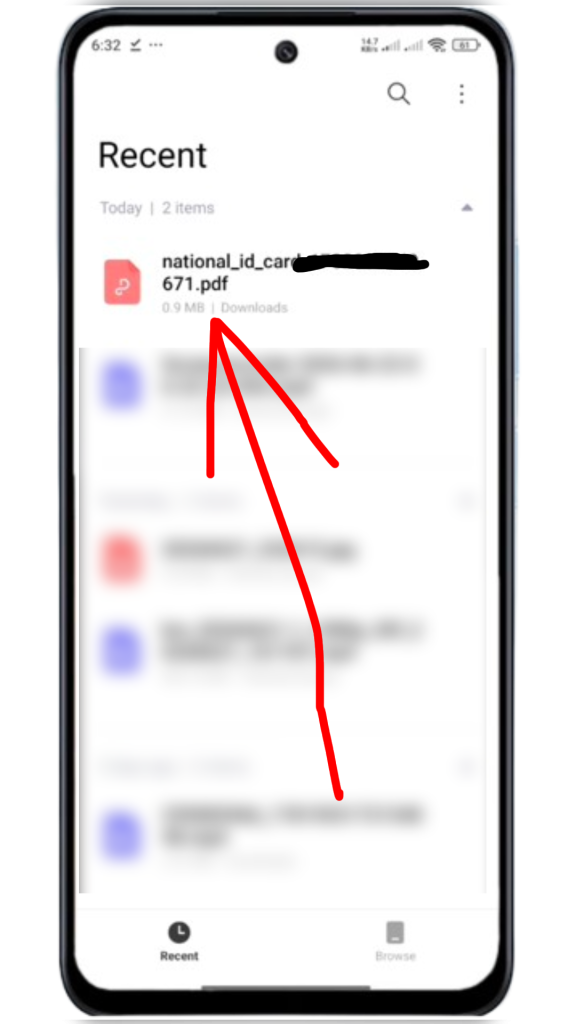
7. Opening Your eNID PDF(Password Protection)
Once you have successfully downloaded the file, you might notice that the PDF is password-protected for security reasons. This ensures that only you can access your sensitive identity details.
What is the Password Format? To open the file, you need to follow a specific password pattern based on your personal credentials. Here is how you can construct it:
- The Formula: The first four letters of your name (in CAPITAL LETTERS) + Your Date of Birth Year (AD/BS as per registration).
Example:
- Name: RAJENDRA KUMAR THAPA
- Date of Birth: 2050/11/27 (Bikram Sambat)
- First 4 Letters of Name: R A J E (must be CAPITAL)
- Date of Birth Year: 2050
- Your Password: RAJE2050
How to Open it:
- Tap on the downloaded PDF file in your “Downloads” or “Recent” folder.
- When the password prompt appears, type your password using the exact format shown in the example above.
- Once you enter the correct code, the PDF will open, and you can view your digital National Identity Card.
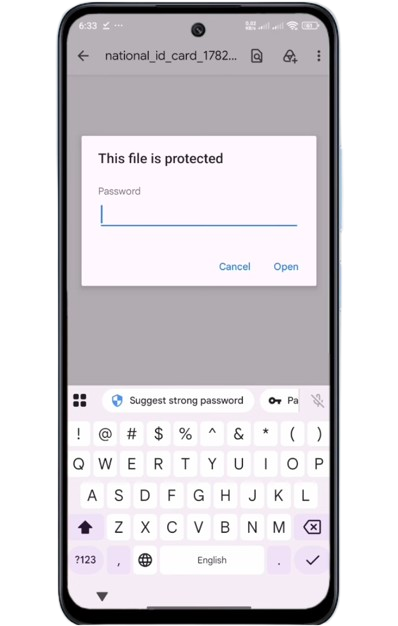
Once you enter the correct code, the PDF will open, and you can view your digital National Identity Card.
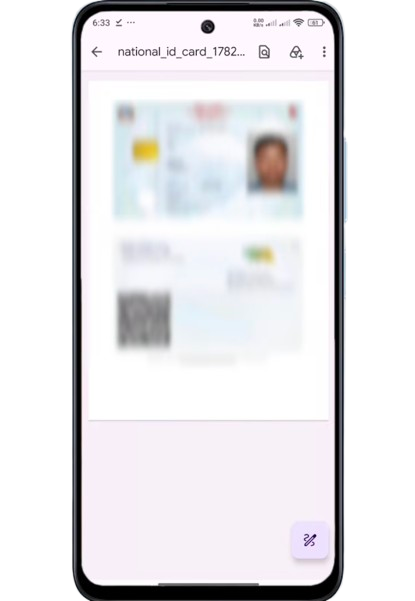
Important Note: Make sure you type your name’s first four letters in UPPERCASE (CAPITAL). If your name has fewer than four letters, type whatever is available, followed by your birth year. Double-check your birth year to ensure it matches exactly what you provided during your registration.
Benefits of eNID
The eNID makes it easier to access your identity information anytime from your mobile phone. It reduces the need to carry physical documents and can be useful while receiving various government and public services. Since the card is available digitally, it can be accessed quickly whenever required.
Common Problems While Downloading eNID
Some users may face issues while downloading their eNID. The most common problems include incorrect personal information, failure to receive OTP verification codes, login errors, unregistered mobile numbers, or server-related issues during peak hours. If you encounter any of these problems, double-check your details, ensure your mobile number is linked to your registration, and try again after some time. In most cases, the issue is resolved once the verification details are entered correctly.
Important Read: If you are also planning to link your ID with other services, check out our guide on: How to Apply PAN Card Using Your National ID.
Watch this video for a live step-by-step tutorial
Conclusion:
Downloading your eNID is a straightforward and safe process that makes it easier to manage your official documents in Nepal. By following the steps above, you can handle your digital identity without needing to carry physical cards. We hope this guide helped you easily Download National Identity Card information. If you still face any errors while you Download Rastriya Parichaya Patra, feel free to ask below.
Frequently Asked Questions (FAQ)
How can I download my National Identity Card eNID in Nepal?
You can download your National Identity Card eNID by visiting the official eNID portal, logging into your account, verifying your identity, and accessing the digital card section. Once verified, you can view or download your eNID online.
What is the difference between eNID and the physical National Identity Card?
The physical National Identity Card is a printed card issued by the government, while eNID is its digital version that can be accessed online through your mobile phone or computer.
Can I download eNID without a National Identity Card number?
No. To access and download your eNID, you must have completed the National Identity Card registration process and provide the required information for identity verification.
Is eNID officially valid in Nepal?
Yes. eNID is the official digital version of the National Identity Card and can be used for identity verification in services where digital verification is accepted.
What should I do if I cannot log in to the eNID portal?
If you cannot log in, make sure you are using the correct mobile number and password. You can also use the password recovery option or contact the concerned support team for assistance.